Wednesday, January 21, 2009

Prototype B - Low Cost Touch Screen Tablet


Was reading Yahoo! Tech news today and I came across this article about a$200 touch screen tablet pc, and I was like whoah!

So I read the article and decided to do some searching on my own and boy was I surprised to find a very cool Tablet being developed by the good people at TechCrunch.


Source:
Touch Screen Tablet Linux PC

Sunday, January 18, 2009

Malwarebytes' Anti-Malware from Malwarebytes.org


This program saved my machine and if you are having connection or any other slow downs with your computer this could be the application that will save your machine!!

I downloaded, updated, and did a quick scan with this product and it located a Trojan that NO OTHER anti-virus program found, Spy-Bot did NOT find it, AVG did NOT find it.

There was apparently a Trojan in my registry file, that was extremely slowing down my computer, and now well, now it is working perfectly!

THANK YOU MALWAREBYTES.ORG!!

http://www.malwarebytes.org/mbam.php

Monday, January 5, 2009

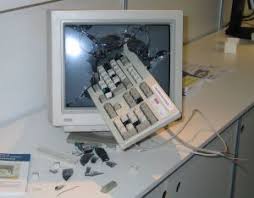
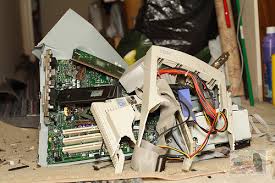
Top 10 Ways to Destroy a Computer or Cell Phone


  1. Dropping it from a building
  2. Throwing it through a window


  3. Smashing it with your fists


  4. Throwing it across the room
  5. Running it over with a car
  6. Putting it in a vice and keep turning till it pops
  7. Beat it with a sledge hammer


  8. Jump on it repeatedly
  9. Punt it through a field goal
  10. Rip it out of work, kicking and screaming, to a green field, and beating it with a bat, then stepping on it with your heals, then beating it with your fists, office space style

Sunday, December 7, 2008

EEStor future battery for the Electric Cars?


Hey All,

Thanks for dropping by. I just got this article from my dad about how EEStor is setting up its soon to be released battery for electric cars, and how it is going to revolutionize the car industry, as well as all electronic devices. They speak a little about how a vacuum could be a re-chargable device as opposed to a plug and use device.

I would recommend this to any one that is interested in learning more about how the progress of the Electric Car battery is truly coming together, and how one day we will all have cars that travel over 100 mpg and we will no longer be reliant on gas stations, and oil.

Article #1 - Beyond Permittivity - 200+ comments
Article #2 - EEstor Prototypes /permittivity

Enjoy!

Thursday, November 27, 2008

Windows XP Service Pack 3 - Firewall Updates


Hey All,

Just wanted to give a general Windows Security Update, as to my current preferences of Security, as well as what melo-drama I have been going through the past month with my internet connection, and lack there of it.

Before installing Service Pack 3 I had Zone Alarm Firewall on my computer, and then decided to upgrade to a different firewall called Sygate Personal Firewall recommended by a co-worker. I tried it out and was impressed, really gave a better set of controls for my personal firewall.

Then I installed Windows Service Pack 3 which as a slew of Security Updates, including update the Firewall, and overall making it more difficult for hackers to take over your computer, and have infectious viruses spreading across your home or work networks. Which is definitely a good thing, but some people are not all for it. Read this review - called Try It If You Dare

Either way my internet almost stopped working when i had the Sygate Personal Firewall on and after downloading and installing Service Pack 3, so my logical thinking is that perhaps these two security programs are tripping each other up, and preventing me from enjoying my internet.

So I decided to not have Sygate start-up automatically when my computer starts, and low and behold my internet is moving 3 times as fast as it was before! Thank God! Haha.

Lesson learned, there is such a thing as too much security!

So now I am currently running my machine using Windows Firewall, and AVG with weekly scans and updates on. That has been the optimal settings for me, what are your security settings?

Best,
Tek-Min-Now Team

PS - HAPPY THANKSGIVING!!!

Saturday, November 8, 2008

Photoshop Freebies - Site of the Week


Hey All,

I have decided to feature a new site I just found called Photoshop Freebies. I have learned an extensive amount of knowledge about Photoshop and how to use this program, and others like it to help create a truly original, 100% unique images.

http://photoshop-freebies.com/photoshop-actions/5-great-photoshop-actions.php

Check it out!

~Tek-Min-Now Team

Saturday, October 18, 2008

How to install ZSNES on the Asus EEE PC 2G Surf


I have successfully done it folks, I have installed ZSNES on my eee pc! Kick ASS!!

Now I can play over 100 games on my EEE that I have ROMS of that are simply different Super Nintendo Games, like Super Punch-out, Super Mario Bros, Tetris, Final Fantasy 3, and many more!

I first tried to install Wine on the EEE and that had several attempts, 1 out of 3 attempts was an actual successful installation, the others did not work. Although Wine would not run the emulators for the SNES Games, so I had to find another option, and so I did on the WIKI EEE SITE! Great site!

Lots of great information here and mainly where I learn how to use the EEE and how to completely customize and harness the true power of the EEE.

Here it is folks - just follow these instructions EXACTLY!! About 10 steps, but very simple and quick to perform. If you have any problems can always fix them by re-starting and holding F9 and starting with the Factory Default Settings. (format)

Here it is - http://wiki.eeeuser.com/howto:install_emulators - enjoy!

If any one has questions do not hesitate to ask!

Tuesday, October 14, 2008

AVG Free


Hey All,

If you are having an issue with your AVG Free software I would recommend downloading the newest version and re-installing it.

Should work then!

Download Free Here - http://free.avg.com/download?prd=afe

Best,
Tek-Min-Now

Sunday, September 21, 2008

How to make an Accordion Vertical and Horizontal Menu with Java Script:


First of all I have to give credit where credit is due, I got the java script and everything from this great site at - http://www.stickmanlabs.com/

They have been able to build a very nice simple way to get accordion menus to work, so I will give you guys the jist of it. I read through the site, and followed the instructions to a tea, but it did not work on my first try. So I went back, what am I doing wrong? I tried to do it again, followed instructions word for word, but still no luck! The instructions leave 2 VERY important keys out of the instructions.

I started to grow very frustrated and did not understand WHY THE HELL IS THIS NOT WORKING!!???!!?!?!?!

But then I decided to really look into his example code and try and figure out exactly what I am missing. There are 5 key sections of the code that you NEED in order for it to work.

You will need to Download the Accordion 2.0 Setup File before we get started.

1. You need to have all 3 javascript calls to the correct files, and you NEED to have the files on your server to access them. Also you need those code that executes and makes available the code that is performing the Accordion animation.

2. Next you will need the Accodion CSS that gives the look and feel to the Accordion tags. Look in the CSS section of www.stickmanlabs.com.

3. You will need the code that you will click on to start the effect, and the container for the content that is being shown or hidden with the Accordion feature. Read stickmanlabs.com tutorial, pretty simple.

Can create as many content section as you would like, you can even make Horizontal ones, but I have not tried this as of yet...

4. You need the Accordion Section div id code that is all the way at the bottom of the page in the sample on StickMan's site. Place this code before the tag in the HTML of the body. - more code to add all the way at the bottom of the page. Hide it by removing all text in it...need it to work though.It is the Horizontal and Vertical code for working.

5. This well I am not quite sure what this does, but I put it in there any way, before the tag as well! But I put it in there and so should you!


Then you can get a site that looks something like this:
Tha Spot aka the place to be - the Google Ads can be shown or hidden with this feature

What do you guys think?

Best,
Tek-Min-Now Team

Friday, September 5, 2008

Google Chrome Web-Browser - Secret Commands


Google's New Web-Browser Chrome has a very cool list of secret commands that share the users data with them selves, displaying how the browser, page, or other data currently is..

Here they are:

  • about:memory
  • about:stats
  • about:network
  • about:internets
  • about:histograms
  • about:dns
  • about:cache
  • about:plugins
  • about:version

you can also go to two special pages on a 

per-site basis.view-cache:[URL] shows you some under-the-hood cache details, and 

view-cache:[URL] shows you the page's markup.


Just found this out from lifehacker he does a great job covering this topic, with screen shots, if you are intested just type any of these commands in the URL Box of the Chrome Web-Browser and you will see some special about pages.


tek-min-now team

Thursday, September 4, 2008

Top 10 Gripes with Google's Chrome Browser


1. No "Super Scroll" (I am coining the term) middle button for quick scrolling on a long page.

Firefox Example:


2. Asks Stupid Questions "Are you sure you want to leave this page?"

Example:
I just deleted a web-part on my blog, this is over kill, no need to ask if I am sure I want to leave the page, and Firefox doesn't ask...


3. Does not search text in text field boxes - for blogger web editing search

I was trying to find a segment of code on my blogger page and I was using the built in search functionality in Chrome, but apparently it DOES NOT search in the text field box where all of the code for the page is, so I had to copy and paste the code into Notebook and do my editing there...I(Firefox does search in the text field boxes)

4. Bookmarks Tab? Could it be any uglier!

Example:
I really love the "Other bookmarks" section, NOT! All the way on the far right? Why would they put this on the right side and not the left side? (since they pop up to the left, and since everyone in America reads left to right, not right to left..) No customization of where these lay, I wish they would add a customization that would allow to have a Bookmarks button that would be next to the back and fowrad and reload buttons, so that it wouldn't make the navigation bar at the top bigger...

5. RSS Tab? Where are all my RSS blogs?

I seem to have lost all of my RSS feeds that I was watching on Firefox. It did successfully import all of my bookmarks and saved passwords, but where are my RSS feeds?

6. Annoying Status Bar

Example:

The status bar in Google Chrome pops-up in the lower left hand corner whenever something is loading is very annoying and can be distracting to the eye. I automatically look to see what is popping up on my screen and realize it is just telling me something is loading, I think they should make it a bar across like in Firefox...this seems odd to me to just display it...

7. Stole Firefox Position on my Windows Start Menu Applications

I downloaded and installed Chrome, and loaded it up and started playing around with it. I realized alot of it seems to work the same as Firefox, if not a little bit worse. So I wanted to go back to Firefox, I goto my Windows Start Menu and it is GONE! Instead of Firefox the Google Chrome application is in it's place! I'm like whoah! This thing is trying to take over! So I added Firefox back in..(right click, pin to start menu)

8. The Web-Site Title is Cut Off

Example:
As you can see the Title is cut off because the browser window tabs are at the top of the page, where the Title of the page is displayed. So the only way to see the full title is to hover the mouse over the tab and the entire title will display as you can see in the image above.

9. No Customization of Navigation Bar Icons

One of my favorite parts of Firefox is you can drag and drop all of there icons on the start menu, with Google's Chrome, they do not offer this functionality. The only option the user has is to display the Homepage Icon or not to display the Homepage icon...annoying.

10. Does not Prevent Cross Site Scripting

Google claims this browser will prevent against Cross Site Scripting, which allows hackers to gain access to your account through opening hidden windows on a users computer, and editing the users profile on there computer, in the background with out the user's knowledge. Although when I am logged in on Gmail with one account, and login to Blogger (owned by Gmail) it automatically signs me into Blogger with the Gmail account...not good!

Summary:

Those are my Top 10 Gripes, Complaints, or just plain Issues with Google's new Web-Browser Chrome. Overall it is a great little browser, it is fast, and light. It works well with google's applications probably a second faster at loading Gmail and other Google Apps. Although these issues as well as some freezing occurs, when loading Flash Animations and goto a new page...

I have had some issues with Flash Animations freezing as well as some fun apps I use slowing down the browser to a crawl, only time it crashed it when I had 3 Chrome windows open, one loading flash, one playing music, and one on Meebo, then the one loading the Flash crashed...I guess they may still have some issues with Flash Animations...

What do you guys think?


other similar articles:

best,
tek-min-now

Monday, September 1, 2008

Google's New Web Browser, Chrome!


This could be the answer to my prayers of a truly efficient, secure, quick, easy, and smart web-browser that will set new guidelines and help unite the standards of the web once and for all, so all browsers can work the same.

Read this comic book from the Inventors of Chrome

Google is stated to have made this browser quicker, easier to use, better javascript handling, and more secure! Sounds like a home run to me, up-front congratulations to Google.

Plus they have a pretty cool logo for it:

Read more specs on Wikipedia


This is releasing on Tuesday September 2nd 2008, can not wait to test it out!

Fresh take on the browser from Google's Official Blog

UPDATE:
It is now available to download the beta version.

To Fun and Safe Surfing,

~ Tek-Min-Now Team

Friday, August 29, 2008

How to Create a Flash Motion Tween


Hey All,

This is a tutorial how to create a flash motion tween. This is how you would use Flash Tools to automate animation of an image. I am going to demonstrate how I was able to create a Flash Transition for my portal page, to my other sites. The final result is at www.kylekorpi.com.

There are a few ways to achieve this Flash Animation effect. I my self did a few rounds of attempts to get this working exactly the way I wanted it to work.

My first attempt I did some custom animation by creating 10 keyframes in succession of each other, and in each keyframe the image moved a little bit.


This worked, but it was not as smooth as I would have liked it to be, and I knew that there was a simpler way to create a simple flash animation like this. VIEW THE FIRST ATTEMPT HERE.

This looks sloppy and keeps repeating, but not bad for a first attempt.

My second attempt I was able to create a Flash Motion Tween that created a really simple nice animation effect, that worked beautifully. All I had to do was create the first position and the last position that I wanted to image to look like, and then create the Motion Tween that creates all of the other frame movements.


This created a much smoother transition than the previous attempt, VIEW SECOND ATTEMPT HERE.

For my third attempt I lengthened the flash transition effect so that it gives a longer view of the animation. I felt that this would give the user a stronger feel that they are actually entering the page, and actually entering the building. VIEW THIRD ATTEMPT HERE.

This one is not only slower but also links to The Teen Zone. Which is the page that it should automatically go to after it displays the flash transition.

Then the final result can be viewed here for any of the buildings with a preview, www.kylekorpi.com.

I used these resources to learn how to do this in flash:
Basics of Flash Animation

If you have any questions feel free to ask!

~ Tek-Min-Now

Sunday, August 17, 2008

How to Fix 800 Width Browsing Issue on the EEE PC 700


I was stumbling upon sites, and I came across this great blog called Tweak3d I started reading through some of there articles, and then I came across this EEE PC article. I own and use a EEE PC so I was naturally curious as to what they had to say about my little laptop. (I have the 700, lowest version)

The article read - How to Efficiently use an 800x480 eee pc, like the one I own. They recommend using Opera for web-browsing since Opera has a Fit to Screen option, that will allow web-sites bigger than 800 pixels to fit to the screen, eliminating the need to scroll left and right!

I was astounded by this so first I am like ok I have the linux eee pc, how do I install Opera on it?

Install Directions Here

I am working on getting it to work now...I will tell you all what happens..

UPDATE:
I got it to work!! It is awesome because you can not only fit to screen, you can also set it so that it is viewing the page at 90% or 80% of the total screen, so it will actually shrink to fit, and you won't have those scroll bars any more!!

This is how I installed Opera on my Linux EEE PC 700:

1. Download from Opera.com - Download Here - Select the "Debian" then "Debian 4.0 (Etch)" and download this one to your EEE PC

2. Figure out where it is saved on your system, probably in cd /home/user/My Documents

3. Open a command prompt (press CTRL + ALT + T) and navigate to the folder with the file

Here are some simple command line commands:
  • dir - list all files in the folder I am currently looking in
  • cd - change what folder I am currently in
  • cd home - go to the home folder
  • cd home/user/My Documents - go to the home/user/My Documents folder
  • sudo dpkg -i [filename] - installs the file on your system
4. Once you are in the folder with the Opera file in it, by typing dir and you see the file in the folder. Type in "sudo dpkg -i opera_your_version" which is probably going to be this:
"sudo dpkg -i opera_9.51.2061.gcc4.qt3_i386.deb"

5. Once it installs type in "Opera" in a command line, you will get a disclaimer pop-up, press Enter to accept it, and Opera will launch!

Any questions?

~ Tek-Min-Now Team

Saturday, August 16, 2008

iPhone Dropping Calls on 3G Network


As many of you know the iPhone recently released a new phone on the faster 3G Network, while this is great, for downloads, web-browsing, email, and other web features, this seems to have had a negative effect on the most important part of having a cell phone, actually making phone calls!

Read the story

What do you guys think? iPhone sucks right?